
Caching and Personalization: A Balancing Act

Modern web development comes with all sorts of concepts and considerations to navigate. Some of these concepts are stand-alone, but some are connected and even at odds with each other. In this article, we’re going to talk through two of these concepts which can be at odds: Caching and Personalization. Let’s start with some definitions.
What is Caching?
Users expect websites to load fast. In fact, studies show that if they don’t, users are more likely to leave your site. There are lots of ways to improve load times, but caching is one of the most important. Caching refers to taking the end result of some complex process and storing it somewhere, so you can serve up that end result next time without the long wait. It can be used to speed up everything from rendering a page on your website to performing a complex database query. Caching is so important in modern web development that many hosting platforms offer it by default.
What is Personalization?
Many websites show the same content to every user, regardless of who they are or what their context is. While this approach often works well, there are times when varying the content shown to a user based on their context (e.g. their interests, or the time they’re accessing the content) can provide a distinct advantage. Personalization aims to address this by varying the content on a website to increase its relevance to the specific user viewing it and the odds that they will engage with it. Personalization comes in many forms:
- Remembering a user dismissed an alert previously, so they don’t see it again
- Displaying open/closed indicators when viewing a list of locations based on the time the user accessed the page
- Providing different content or recommended products based on the current user’s interests or actions
The Problem
Those both sound like useful tools, so what’s the issue? The issue is that these two techniques are conceptually at odds: On the one hand, we want to pre-render pages and serve the cached results on every page load to improve load times. On the other hand, we want the content to be personalized for each user to increase its relevance. So what options do we have? Do we have to choose either caching or personalization on our websites?
Some Solutions
We’re going to spend the rest of this article walking through some potential solutions for using both caching and personalization on a website. While this isn’t an exhaustive list of the options, we will talk about three of the most common approaches.
Option 1: Turn off Caching
This is by far the simplest option, but it also comes with arguably the biggest downside. If you want to show personalized content on a given page, just turn off caching for that page. Chances are your hosting platform provides one or more mechanism to skip caching on specific pages (for example, our platform of choice Pantheon makes it possible to bypass caching by setting specific cookies)
- Pros: It’s easy, and most platforms have multiple options to achieve it.
- Cons: Turning off caching can have a negative impact on your website’s performance, and depending on the platform it might increase your hosting costs.
Option 2: Load Personalized Content Separately
If we’re going to leave caching in place, we need a way to ensure users see personalized content in the contexts we want them to. One way to achieve this is to dynamically load and update personalized content after the initial cached page load. That way, you get the benefit of caching for the majority of the page and the ability to customize what the user sees after that initial load. A common technique for this option is to use JavaScript to fetch the personalization data after the initial load, and then modify the page content:
fetch('/path/to/some/personalization/api/or/script')
  .then(response => response.json())
  .then(data => {
    document
      .getElementById('personalizationTarget')
      .innerHTML = data.personalizedContent;
  })
This option is best employed for smaller personalization touches, like the dismissible alerts or open/closed indicators mentioned previously, as illustrated below:
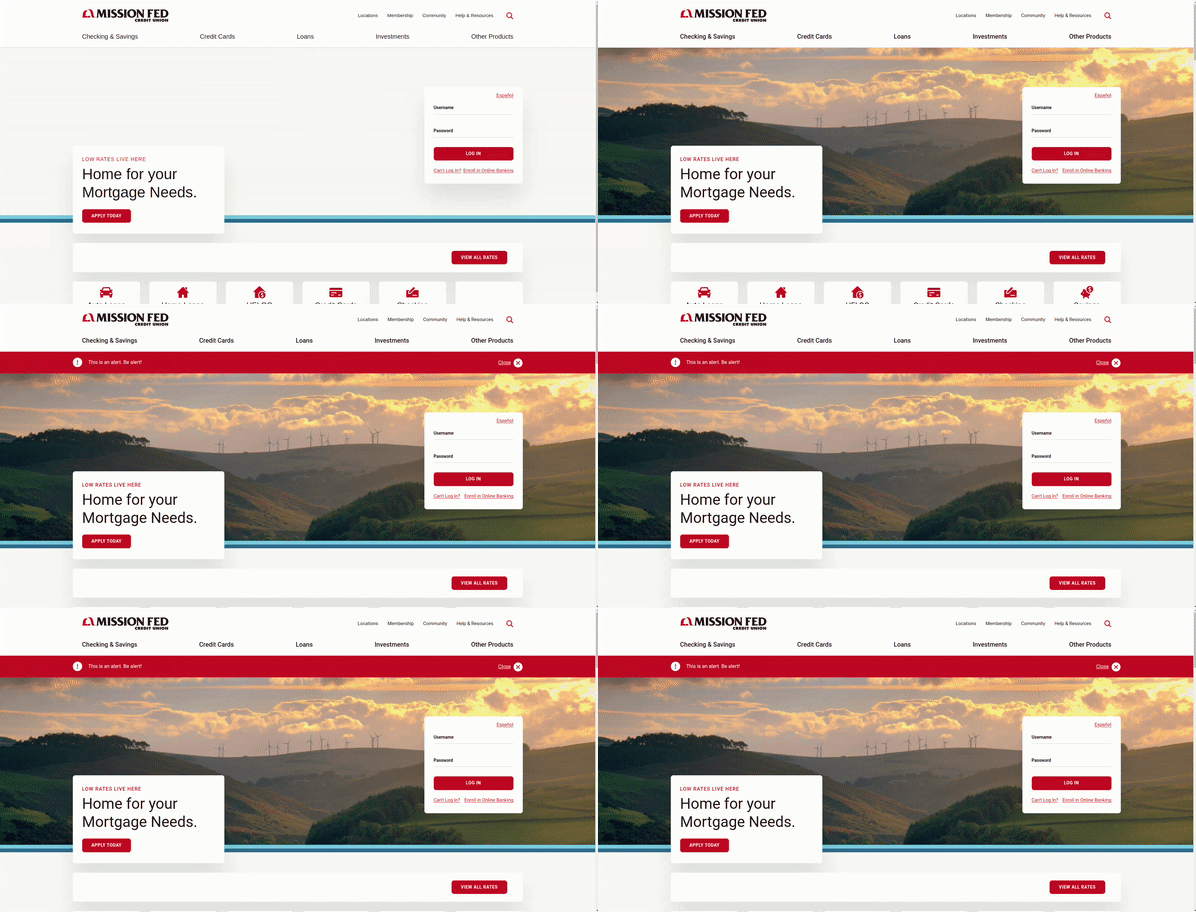
The effect is subtle but noticeable: when an alert is added to the page after the initial load, the content shifts down slightly. But if this technique was used to swap out an entire section of the page, that could be jarring for the user.
- Pros: Leaves page caching in place, and personalization can be tuned to specific user context.
- Cons: Requires custom development, can be visually distracting, and depending on the platform it might increase your hosting costs.
Option 3: User Segmented Cache
Our third and final option is the most technically advanced, but gets us much closer to seamlessly using both caching and personalization at the same time. A user segmented cache is a technique in caching where users can be identified as part of a group (for example, based on geographic location or interest), and that group will be presented with cached content which is specifically relevant to them. This technique often relies on the Vary header, and is supported by hosting platforms like Pantheon and WP Engine.
We partnered with Mission Federal Credit Union to provide personalized content to users on their homepage based on the type of content they had last accessed on their site, using WP Engine’s user segmented caching functionality. You can try it out yourself:
1. Visit the Mission Federal Credit Union homepage.
2. Now visit one of their pages related to credit cards, auto loans, or checking accounts.
3. Your next visit to the home page should result in the call to action content in the header changing based on what you visited last.
This is a very flexible solution, but like all the other solution we’ve explored, it has its own list of pros and cons:
- Pros: Personalized page content can be cached.
- Cons: Requires a platform that supports this feature, and is better-suited for groups of users vs individuals
Balancing Speed and Relevance
A range of solutions ensures your website will be optimized to provide fast loading times while providing personalized content to enhance user engagement. The right solution can vary by user needs and website requirements. Want to have a conversation to find out how to develop the best solution for your website? We’d be happy to talk.