
Improving Transit Website Usability: Common Issues and Solutions

The first time I rode the city bus was in 2007. My friend used a book of bus schedules to find the nearest route to the mall, looked at the schedule grid to find the closest stop from my house, and pointed at the next available departure on this page. This bus schedule book quickly became my essential guide during those middle and high school years to get around Tacoma.
Fast forward to 2023 in a post-pandemic world, many transit agencies have stopped printing tangible bus schedule booklets and only have that information available on their websites. It’s a solution that can sometimes create frustrations for riders. We know this because our UX team has worked with a few transit agencies and helped leverage insights from rider focus groups and usability tests to improve usability.
From accessibility to trip planning tools, here are ways to improve website usability for transit riders.
Common Issue #1: Alternative Text on Images
For website user who utilize assistive technologies such as screen readers, writing clear and concise alternative text in place of images is vital. Screen readers announce alternative texts and help users with visual impairments perceive the content and function of the images. In addition, if an image fails to load, the web browser will display the alternative text visually in place of the image.
As an example, one transit website we examined had the following image on its website:

After taking a closer look and reviewing the HTML code, the current alternative text provided on the image does not follow best practices according to WebAim’s recommendations. The HTML code and alternative text for this image is written as follows. Alternative text is in bold:
<img alt=”UmoPass-Banner-Ad_no-date” src=”/files/library/umopass-banner-adno-date.jpg” title=”UmoPass-Banner-Ad_no-date”>
The current alternative text provided on this image does not provide users who use screen readers much context and clarity in the way it’s written.
To resolve this accessibility issue, inspect all the HTML attributes for all the images across your website. To write clearer alternative text, follow WebAim’s best practices:
- Keep in mind the content and function of the image
- Only a few words are needed for alternative text.
- No redundancy
- Don’t provide the same as text near the image
- Do not include phrases like “image of…” or “graphic of…”
- This would be redundant since screen readers already announce “graphic” along with alternative text.
Common Issue #2: Skipped Level Headings
Headings provide document structure and facilitate keyboard navigation by users of assistive technology. Headings benefit all users, as they keep content organized and help users quickly find the particular content they’re looking for. In order for screen readers users to benefit from headings, the headings must be identified accordingly (Heading 1, Heading 2, etc).
On some transit websites we reviewed, skipped level headings were present (for example: a Heading 1 followed by a Heading 3 with no immediate Heading 2 present). In this web page example, the top content starts with a Heading 1 attribute with the heading “Maps, Stations & Routing”. However, it is then followed by a Heading 3 attribute with the headings “Schedules and Maps”, “System Maps”, and “Other Maps”.
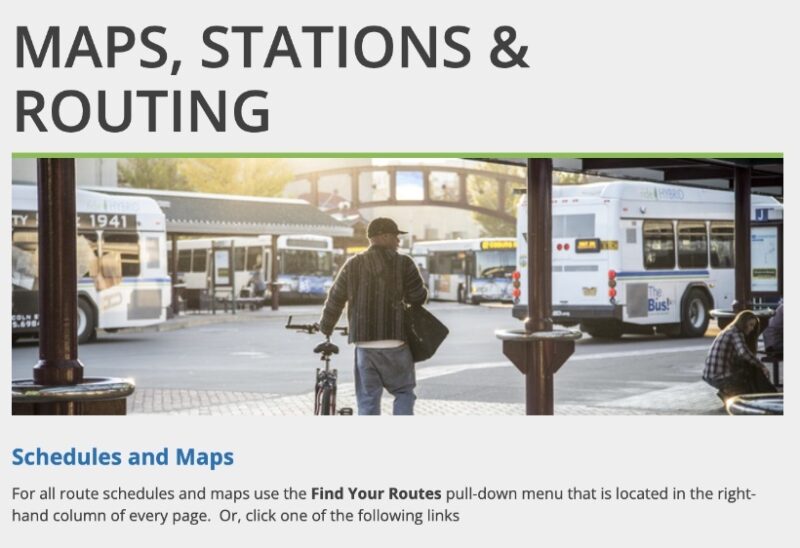
When heading structure skips or reverses heading levels, this breaks the outline and can cause users confusion in figuring out the relationships between sections of the page. To resolve this, review all the web pages on your website and restructure any document headings to ensure heading levels are not skipped.
Common Issue #3: Not Optimized for Mobile
It is crucial that transit agencies create a mobile-friendly website as riders tend to access the website when they are out and about. Failing to optimize for various screen sizes can lead to a frustrating experience for riders and inability to find the necessary information they need.
One specific feature that is difficult to view on a mobile phone are bus routes schedules that are displayed in a grid time table. Users sometimes have to pinch their phone screens in order to zoom in and out to view the bus schedule. This can be a challenge for riders to access timely information.
Common Issue #4: Confusing Trip Planning Tools
When it comes to trip planning, each transit agency has a different approach to which tools they provide on their site for riders. Some agencies have a trip planning feature directly on their website or some redirect riders to using Google Maps. Of the transit websites we reviewed, some agencies had complex trip planning tools that were difficult to use. Some of the challenges were inputting information about start and ending locations and comprehending the written step-by-step directions. To have an effective trip planner on your website, ensure that it is intuitive to use and provide accurate information for riders to easily plan their journey.
Common Issue #5: Lack of Real-Time Bus Information
One of the most important features to provide riders on your website is the ability to locate where their bus is in real-time. Of the websites we reviewed, some transit agencies did not provide enough information to help inform their riders about the buses’ real-time location. Some examples included not providing a map of the buses’ location to pinpoint and not displaying the delayed time of the bus enroute. There were also a handful of transit agencies that did not provide any real-time bus information at all. To better meet your riders’ needs, provide real-time bus information on your website so they can plan their trip accordingly, see whether a bus is delayed and how this will impact them, and make conscious decisions of their journey.
The Results: Better Websites, Better Rides
Having a usable transit website is important for your community’s riders. By resolving key accessibility issues and improving website usability, your riders’ priorities will be top of mind.
In the next few months, stay tuned for more articles we’ll be publishing about the top features and best practices for transit websites. Are you ready to learn more about your riders and how to further improve your website? Let’s chat, we’d love to connect with you.